XFactorDev.net Article   XFactorDev.net Article


Prt-5- Cubes ...cubes everywhere...


To many of you'se following the tutorial its not really been a bag full of excitment upto NOW...but hold on....you can't expect a 2000ton mega monster like this to get going straight away...it takes time to get it rolling...but it wont' be long now.  So I thought I'd put together a CCube class, so that you can actually place objects in this 3D world and see that everything is working....a red screen might be okay, but you need more I hear you say...MOorreee!...


Also we can use this a test class you might think of it...maybe later on when where testing our gamepad class and we need to move an object around, we could use the CCube to be that simple test object.


On with the coding..


Hmmm...so what should we put in CCube ?....well I think it needs 3 member functions....they are:


bool Create( IDirect3DDevice8 **p );

bool Release();


void Move(int x, int y, int z);

bool Render();


Can't be more simple...of course later on we can add some more member functions, such as Rotate(..), Scale(..), SetDimensions(..) etc, but we can add them later....for now its a bare bone Cube!


Some member variables you should know about:

m_x, m_y and m_z will hold our position in the 3D world of our cube.


This is the vertex buffer for our vertices that we'll generate.

IDirect3DVertexBuffer8  *m_pVertexBuffer = NULL; // Vertices Buffer


Pointer to our ScreenObject, which we'll pass when we create.

IDirect3DDevice8 *m_pD3DDevice;


  ScreenCapture:


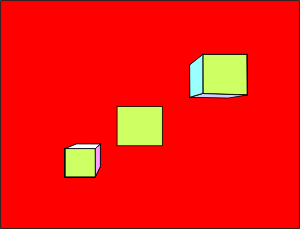
Well thought I'd give you an example of what it looks like when you try and place a few cube's on the screen!...So above is a screencapture of what to look forwards to.


A few points on the code....I've added a few lines to the gameloop(..) function in game.cpp that creates the viewport and perspective, later on we're going to put this code in a CCamera class so we can move around the 3D world, but for now its just fixed.  Its needed so we can set up Perspective (e.g. things get smaller as they get farer away)....also the default for DX8 is that anything further away than 1 is clipped...so you can't see it...changed these values to different near and far values.


Lets take a looksy at our CCube code...its not optimised, but its self contained....which equates to a CCube class that we can improve for speed and performance later on if we want!


class CCube

{

protected:

      IDirect3DDevice8  *m_pD3DDevice;


      // The cubes position in our 3D world!

      float m_x;

      float m_y;

      float m_z;


protected:


      IDirect3DVertexBuffer8  *m_pVertexBuffer;


      struct stCustomVertex

      {

            FLOAT x, y, z; // The transformed position for the vertex.

            DWORD colour;       // The vertex colour.

      };


      DWORD m_vertex_format;


      // These are our setup member funtions, call once at the beginning, once at

      // the end.

public:

      bool Create( IDirect3DDevice8** pDevice );

      bool Release();


      // Now for our two user functions, just incase we want to move our cube around

      // and actually render it to the screen.


      void Move(float x, float y, float z);

      void Render();


};


And for the actually code that does it all.... now at first glance it looks like a lot, but..BUTT...most of it is just the declaring all the vertex points and then copying them into our DirectX buffer.


/***************************************************************************/

/*                                                                         */

/*  File:    cube.cpp                                                      */

/*                                                                         */

/*  Details: Cube class - allows us to create cubes, and render then all   */

/*           over our 3D world                                             */

/*                                                                         */

/*  Auth:    x-factor development (http://www.xfactordev.net)              */

/*           Ben_3D@xfactordev.net or contact@xfactordev.net               */

/*                                                                         */

/***************************************************************************/


#include "cube.h"


bool CCube::Create(IDirect3DDevice8 **pDevice)

{

      m_pD3DDevice = *pDevice;


      // Lets set the cubes initial position to 0,0,0 the center of our world!

      m_x = 0.0f;

      m_y = 0.0f;

      m_z = 0.0f;


      // Set up our 3D Data storage are on the graphics card

      m_vertex_format = D3DFVF_XYZ|D3DFVF_DIFFUSE;


      // Here I'm going to define my cube, its x,y,z and colour components for

      // all the sides.

    stCustomVertex cvVertices[] =

    {

            // x        y      z            colour

            // Front of the cube

            {  0.5f,  0.5f,-0.5f, D3DCOLOR_XRGB( 0,  255,  0  ),}, // top left

            { -0.5f, -0.5f,-0.5f, D3DCOLOR_XRGB( 0,  255,  0  ),}, // triangle

            { -0.5f,  0.5f,-0.5f, D3DCOLOR_XRGB( 0,  255,  0  ),}, // (green)


            {  0.5f,  0.5f,-0.5f, D3DCOLOR_XRGB( 0,  255,  0  ),}, // bottom right

            {  0.5f, -0.5f,-0.5f, D3DCOLOR_XRGB( 0,  255,  0  ),}, // triangle

            { -0.5f, -0.5f,-0.5f, D3DCOLOR_XRGB( 0,  255,  0  ),}, //


            // Back of our cube

            { -0.5f,  0.5f, 0.5f, D3DCOLOR_XRGB(255, 255,  0  ),}, //

            { -0.5f, -0.5f, 0.5f, D3DCOLOR_XRGB(255, 255,  0  ),}, //

            {  0.5f,  0.5f, 0.5f, D3DCOLOR_XRGB(255, 255,  0  ),}, // (yellow)


            { -0.5f, -0.5f, 0.5f, D3DCOLOR_XRGB(255, 255,  0  ),}, //

            {  0.5f, -0.5f, 0.5f, D3DCOLOR_XRGB(255, 255,  0  ),}, //

            {  0.5f,  0.5f, 0.5f, D3DCOLOR_XRGB(255, 255,  0  ),}, //


            // Top of our cube

            {  0.5f,  0.5f, 0.5f, D3DCOLOR_XRGB(255, 255, 255 ),}, //

            { -0.5f,  0.5f,-0.5f, D3DCOLOR_XRGB(255, 255, 255 ),}, //

            { -0.5f,  0.5f, 0.5f, D3DCOLOR_XRGB(255, 255, 255 ),}, // (white)


            {  0.5f,  0.5f, 0.5f, D3DCOLOR_XRGB(255, 255, 255 ),}, //

            {  0.5f,  0.5f,-0.5f, D3DCOLOR_XRGB(255, 255, 255 ),}, //

            { -0.5f,  0.5f,-0.5f, D3DCOLOR_XRGB(255, 255, 255 ),}, //


            // Bottom of our cube

            { -0.5f, -0.5f, 0.5f, D3DCOLOR_XRGB(255,  0,  255 ),}, //

            { -0.5f, -0.5f,-0.5f, D3DCOLOR_XRGB(255,  0,  255 ),}, //

            {  0.5f, -0.5f, 0.5f, D3DCOLOR_XRGB(255,  0,  255 ),}, // (blue)


            { -0.5f, -0.5f,-0.5f, D3DCOLOR_XRGB(255,  0,  255 ),}, //

            {  0.5f, -0.5f,-0.5f, D3DCOLOR_XRGB(255,  0,  255 ),}, //

            {  0.5f, -0.5f, 0.5f, D3DCOLOR_XRGB(255,  0,  255 ),}, //


            // Left of our cube

            { -0.5f,  0.5f, 0.5f, D3DCOLOR_XRGB( 0,  255, 255 ),}, //

            { -0.5f, -0.5f,-0.5f, D3DCOLOR_XRGB( 0,  255, 255 ),}, //

            { -0.5f, -0.5f, 0.5f, D3DCOLOR_XRGB( 0,  255, 255 ),}, //


            { -0.5f,  0.5f, 0.5f, D3DCOLOR_XRGB( 0,  255, 255 ),}, //

            { -0.5f,  0.5f,-0.5f, D3DCOLOR_XRGB( 0,  255, 255 ),}, //

            { -0.5f, -0.5f,-0.5f, D3DCOLOR_XRGB( 0,  255, 255 ),}, //


            // Right of our cube

            {  0.5f, -0.5f, 0.5f, D3DCOLOR_XRGB( 255, 0,  255 ),}, //

            {  0.5f, -0.5f,-0.5f, D3DCOLOR_XRGB( 255, 0,  255 ),}, //

            {  0.5f,  0.5f, 0.5f, D3DCOLOR_XRGB( 255, 0,  255 ),}, //


            {  0.5f, -0.5f,-0.5f, D3DCOLOR_XRGB( 255, 0,  255 ),}, //

            {  0.5f,  0.5f,-0.5f, D3DCOLOR_XRGB( 255, 0,  255 ),}, //

            {  0.5f,  0.5f, 0.5f, D3DCOLOR_XRGB( 255, 0,  255 ),}, //

    };


      //Create the vertex buffer from our device

    m_pD3DDevice->CreateVertexBuffer( sizeof(cvVertices),

                                                            0,

                                                            m_vertex_format, // D3DFVF_XYZRHW|D3DFVF_DIFFUSE

                                                            D3DPOOL_DEFAULT, &m_pVertexBuffer);


      // Temporary pointer.

      VOID* pVertices;

      //Get a pointer to the vertex buffer vertices and lock the vertex buffer

    m_pVertexBuffer->Lock(0, sizeof(cvVertices), (BYTE**)&pVertices, 0);


    //Copy our stored vertices values into the vertex buffer

    memcpy(pVertices, cvVertices, sizeof(cvVertices));


    //Unlock the vertex buffer

    m_pVertexBuffer->Unlock();


      return 1; // all okay

}


bool CCube::Release()

{

      m_pVertexBuffer->Release();


      return 1; // all okay

}


// Moving and Rendering our Cube is a matter of 2 other functions....


void CCube::Move( float x, float y, float z)

{

      m_x = x;

      m_y = y;

      m_z = z;

}


void CCube::Render()

{

      // -A1- Start - These few lines set our rendering to turn lighting off,

      // or we'll not see our cube if there's no light!... Also made sure ZBuffer

      // is on, so we can draw shapes into the 3D world!

      // Finally - turn Culling on, so we dont' draw back of triangles.

      // Turn lighting off, as where only using rgb values

      m_pD3DDevice->SetRenderState(D3DRS_LIGHTING, false);

    //Turn on z-buffering

    m_pD3DDevice->SetRenderState(D3DRS_ZENABLE,  D3DZB_TRUE);

      // Our shape is draw with each triangle clock wise, so we cull, or

      // should I say not draw counterclockwise triangles.

    m_pD3DDevice->SetRenderState(D3DRS_CULLMODE, D3DCULL_CCW);

      // -A1- End


      // -B1- Start - these lines move our 3D cube to its position in the 3D

      // world, as we set the D3DTS_WORLD with out tranMatrix.

      D3DXMATRIX matWorld;

      D3DXMATRIX trans_matrix;   //Our translation matrix


      // set our matWorld matrix to an identiy matrix...e.g. set it to 1

      D3DXMatrixIdentity( &matWorld );


      //Set up the translation matrix and move our cube where its suppose to go.

      D3DXMatrixTranslation(&trans_matrix, m_x, m_y ,m_z);

      //Combine out matrices

      D3DXMatrixMultiply(&matWorld,&matWorld, &trans_matrix);

      //Set our World Matrix

      m_pD3DDevice->SetTransform(D3DTS_WORLD, &matWorld );

      // -B1- End


      // Rendering our cube

    m_pD3DDevice->SetStreamSource(0, m_pVertexBuffer, sizeof(stCustomVertex));

    m_pD3DDevice->SetVertexShader(m_vertex_format); // D3DFVF_XYZ|D3DFVF_DIFFUSE


      int iTriangles = 12;

    m_pD3DDevice->DrawPrimitive(D3DPT_TRIANGLELIST, 0, iTriangles);

}


Its not as complex as it looks....all it does it draw a cube... you could do one for a CSphere, and a CPyramid later on....even create a game called 'Shape World'...heheh


How would we use such a CCube class?...same as before more or less


{STEP -1-} Add the header to our game.h file:

      #include "code/cube/cube.h"


{STEP -2-} Create an instance of a CCube or three of them... and call Create(..) member function

      CCube cubeA;

      CCube cubeB;

      CCube cubeC;


      cubeA.Create( &pD3DDevice );

      cubeB.Create( &pD3DDevice );

      cubeC.Create( &pD3DDevice );


{STEP -3-} Optionally, set the Cube's position with Move(..), else it will be located at 0,0,0.

      cubeB.Move( -3,   -1,   3.0f);

      cubeC.Move(  1.5,  1.5, 0.0f);


{STEP -4-} Render it in the GameLoop....this draws our cube!

     cubeA.Render();

     cubeB.Render();

     cubeC.Render();


{STEP -5-} Good boys always tidy up!  So after all is done and finished, call Release(.);

     cubeA.Release();

     cubeB.Release();

     cubeC.Release();


Now if you look at my game.cpp and the gameloop(..) function you'll notice that I've put all of the above steps 2-5 in the same function....its not really the best way to do this as your constantly destroying and creating the 3D Cube, so it will have a performance hit....but for our testing needs I just put it in there....you make your instance (e.g. CCube cubeA) and call Create(..) once in the constructor, and Release() in the destructor...giving you a 90% performance boost ;)


GameCode....

I'll show you it...just so you can see what's been added.....


d

/***************************************************************************/

/*                                                                         */

/*  game.h                                                                 */

/*                                                                         */

/***************************************************************************/ 

#include "code/graphics/graphics.h"


// NEW NEW NEW NEW NEW NEW NEW NEW NEW NEW NEW NEW NEW NEW NEW NEW NEW NEW

// NEW NEW NEW NEW NEW NEW NEW NEW NEW NEW NEW NEW NEW NEW NEW NEW NEW NEW

#include "code/cube/cube.h"


class CGame

{

protected:

      // Lets create an instance of our CGraphics class!...m for member, and

      // I chose g for graphics.....not a very descriptive name but I like it.

      CGraphics m_g;


public:

      // Initilisation called only once in the constructor

      CGame();


      // GameLoop, gets called repeatedly while it returns 1;

      bool GameLoop();


      // Cleanup process, all done in our destructor

      ~CGame();

};


/***************************************************************************/

/*                                                                         */

/*  game.cpp                                                               */

/*                                                                         */

/***************************************************************************/

#include "game.h"


// Initilisation called only once in the constructor

CGame::CGame()

{

      m_g.Create();

}


// GameLoop, gets called repeatedly while it returns 1;

bool CGame::GameLoop()

{


      IDirect3DDevice8 *pD3DDevice = NULL;

      m_g.GetScreen( &pD3DDevice );


      // NEW NEW NEW NEW NEW NEW NEW NEW NEW NEW NEW NEW NEW NEW NEW NEW NEW NEW

      CCube cubeA;

      CCube cubeB;

      CCube cubeC;


      cubeA.Create( &pD3DDevice );

      cubeB.Create( &pD3DDevice );

      cubeC.Create( &pD3DDevice );


      // if we dont use move(..) its detault is at 0,0,0

      cubeB.Move( -3,   -1,   3.0f);

      cubeC.Move(  1.5,  1.5, 0.0f);


      // Lets use it to clear the screen....set it to red ;)

      // Clear the backbuffer to black

      pD3DDevice->Clear(0, NULL, D3DCLEAR_TARGET|D3DCLEAR_ZBUFFER, D3DCOLOR_XRGB(255, 0, 0), 1.0f, 0);


      //camera camera camera camera camera camera camera camera camera camera

      D3DXMATRIX view_matrix, matProj;


      D3DXMatrixLookAtLH(&view_matrix,&D3DXVECTOR3( 0.0f, 0.0f,-4.0f ),

                        &D3DXVECTOR3( 0.0f, 0.0f, 0.0f ),

                        &D3DXVECTOR3( 0.0f, 1.0f, 0.0f ));


      pD3DDevice->SetTransform(D3DTS_VIEW,&view_matrix);


      D3DXMatrixPerspectiveFovLH(&matProj, //Result Matrix

                        D3DX_PI/2,//4,//Field of View, in radians. (PI/4) is typical

                        ((float)600 / (float)400),     //Aspect ratio

                        1.0f,     //Near view plane

                        1000.0f ); // Far view plane


      pD3DDevice->SetTransform( D3DTS_PROJECTION, &matProj );

      //end camera end camera end camera end camera end camera end camera end


      // Begin the scene

      pD3DDevice->BeginScene();


      // NEW NEW NEW NEW NEW NEW NEW NEW NEW NEW NEW NEW NEW NEW NEW NEW NEW NEW

      cubeA.Render();

      cubeB.Render();

      cubeC.Render();


      // End the scene

      pD3DDevice->EndScene();


      // Filp the back and front buffers so that whatever has been rendered on the

      // back buffer will now be visible on screen (front buffer).

      pD3DDevice->Present(NULL, NULL, NULL, NULL);


      // NEW NEW NEW NEW NEW NEW NEW NEW NEW NEW NEW NEW NEW NEW NEW NEW NEW NEW

      cubeA.Release();

      cubeB.Release();

      cubeC.Release();


      // Return 1 for the game to continue, 0 to terminate.

      return 1;

}


// Cleanup process, all done in our destructor

CGame::~CGame()

{

      m_g.Release();

}


[Wise Saying :] Every day is a new adventure....


  XFactorDev.net Article


webmaster@xfactordev.net